Setting up Nofence
Drawing and designing pastures
Drawing and designing pastures
Drawing and designing pastures
Drawing and designing pastures
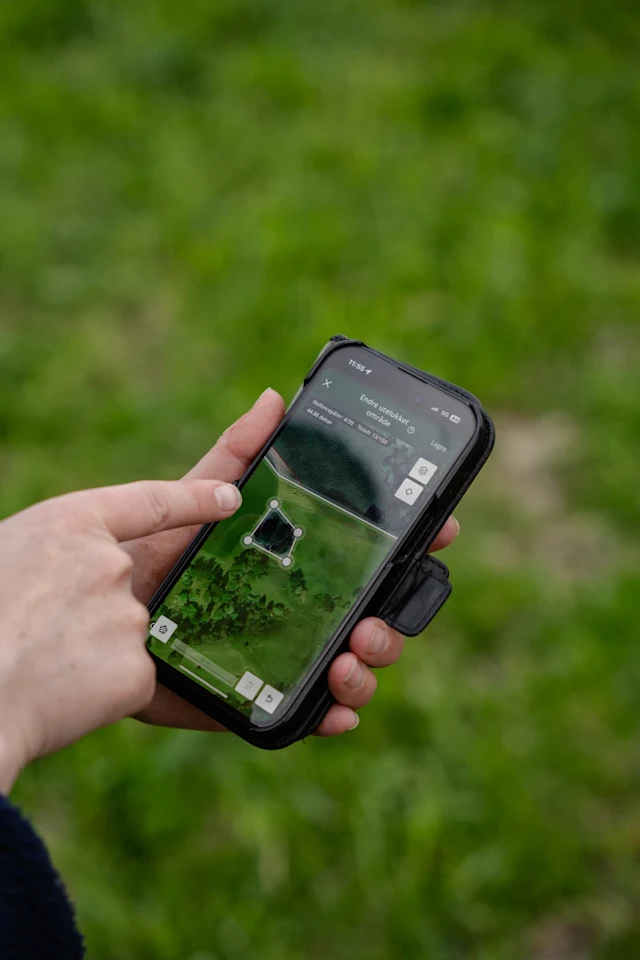
Drawing and designing pastures is simple. Admins and standard users can create, edit, move, and delete pastures from the Nofence app.
Tap the plus button on the pasture screen to get started. You can choose between a training pasture for herds new to Nofence, or a standard pasture for trained livestock.
Drawing a pasture

Tap on the map to place points and draw your boundary. The map displays lakes, woodland, and other physical features to help you plan. You can also add map markers, exclusion zones, and physical barriers, like fences and walls.
Map markers. Map markers let you plan your pastures and keep track of terrain without needing to be on-site. Mark wooded areas, water troughs, lakes, and other features so you can redraw boundaries from anywhere while keeping a clear picture of the pasture layout.

Exclusion zones. Exclusion zones let you block off areas within the virtual fence. Use them to quickly cordon off hay stores, flooded areas, or other areas you want to keep the herd away from.
Note: Avoid making exclusion zones too small. Make sure there is at least 25 metres between exclusion zone boundaries. If the distance is too short, animals can become trapped between two boundaries and have difficulty maneuvering out. Where possible, create one large exclusion zone rather than several small ones. For example, instead of excluding each tree individually, draw a single zone around the whole group. This is easier for the animals to understand.

Drawing physical fences and walls. Virtual fences can work across areas where physical fencing would be difficult or impossible, but it's still worth marking your physical boundaries on the map. This helps you design pastures accurately and keep context when you're off-site.
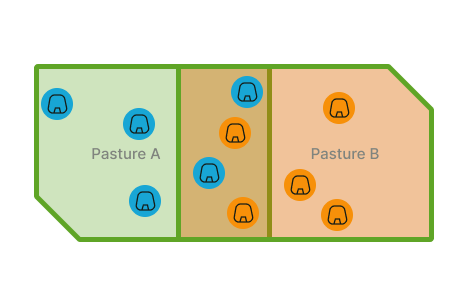
Overlapping pastures. Multiple pastures can overlap. This is useful for rotational grazing or when expanding and contracting grazing areas over time.
Rivers and difficult terrain. Nofence can be used across rivers and challenging terrain. Keep GPS accuracy considerations in mind when working in these areas.
Best practices for pasture design
Good pasture design makes the system more effective and reduces stress on your animals. Here’s a quick overview of what to keep in mind when drawing your boundaries:
Sufficient space. Boundaries should be more than 25 metres so animals have room to turn back without immediately hitting another boundary.
Access to food and water. Animals without reliable access to food and water may attempt to escape.
Corners and angles. Avoid angles less than 90 degrees. Sharp corners can confuse animals.
Narrow pastures and corridors. Pastures should be at least about 10 metres wide. Narrow layouts can disorient animals and cause GPS inaccuracy when animals are resting.
Herd instinct. If splitting a herd into separate pastures, ensure the groups are far enough apart that they cannot see, hear, or smell each other.
Distance from buildings. Leave a clear gap between buildings and the virtual boundary to avoid GPS interference.
Distance from dangerous areas. The boundary is where the audio warning starts, not where the animal stops. Leave enough buffer between the boundary and any hazard.
Why sufficient space is needed
Animals need enough room to turn around after crossing the boundary without immediately encountering it again. The distance between boundaries should be more than 25 metres. Animals still learning the system need more space than trained animals. Stocking density will vary depending on topography, feed quality, and number of buildings within the pasture, so always err on the side of more space.
Important considerations for narrow pastures and corridors
Pastures should be at least 10 metres wide. Narrow corridors can confuse animals, as they encounter boundaries in multiple directions. They can also cause GPS inaccuracy when animals are resting, leading to unwanted warnings or pulses inside the pasture. If a narrow layout is unavoidable, consider combining Nofence with a physical fence on one side.
If some animals are on one side of a narrow corridor and others are on the other side, herd instinct may cause them to cross it to rejoin the group. Keep this in mind when designing pastures where the herd might be split. Experienced animals handle narrow pastures better than those recently introduced to Nofence.
Fencing near buildings and the importance of shelter beacons
Walls and buildings can affect GPS accuracy, causing the collar to log inaccurate positions. If the pasture boundary runs too close to a building, animals may cross it without receiving a warning. Leave a clear distance between buildings and the virtual boundary. If you need animals close to a barn but not inside the yard, consider combining the Nofence boundary with a physical fence. Where buildings are unavoidable, install shelter beacons to prevent unwanted warnings and improve positioning accuracy.
Fencing near dangerous areas
If the pasture is close to a dangerous area such as a busy road, leave enough distance between the boundary and the hazard so that animals turn back before reaching it. Remember that the boundary is where the audio warning starts, not where the animal stops. Animals moving downhill may travel faster and cover more ground before turning, so place the boundary further up the slope in these situations. To check where the audio warning starts, carry a collar around the area and observe in the app.
Using movement data to improve your pasture design
In the app or in the grazing map in your account, you can view your animals' movement patterns, along with where audio warnings and pulses have been delivered. Use this information to identify areas where the boundary should be adjusted. When an escape occurs, investigate the cause so it can be prevented in the future.